
Download Hard Disk Scrubber – hard disk scrubber, data eraser, secure file deletion, permanent data wipe, file shredder, hard drive cleanup, secure data disposal, hard disk cleaner, disk eraser, secure deletion tool
Overview
Hard Disk Scrubber is a dedicated utility developed by Systweak Software for users seeking to permanently erase sensitive data from their Windows-based systems. Designed with data privacy and security in mind, the tool addresses the critical need for irreversible file deletion, ensuring that no trace of confidential information can be recovered through digital forensics or data recovery software. This is especially vital when disposing of old devices, transferring computers, or complying with data protection regulations. The app serves a broad range of users, including individuals concerned about personal privacy, small business owners managing client data, and IT professionals responsible for secure data disposal.
Although the developer did not provide additional technical details about the development background or company history, the tool’s release date of February 8, 2010, indicates a long-standing presence in the data security niche. Its continued availability as a free utility suggests a commitment to accessible data protection. Real-world use cases include clearing personal documents before selling a laptop, sanitizing drives after a data breach, or preparing systems for reuse within an organization. In the broader app ecosystem, Hard Disk Scrubber fills a vital role as a specialized tool for secure data destruction—offering a focused alternative to general-purpose cleanup utilities.
Key Features & Functionality
- Permanent File Destruction: Hard Disk Scrubber overwrites selected files with multiple passes, rendering them completely unrecoverable. This feature is essential for users who must ensure that deleted files cannot be restored through any means.
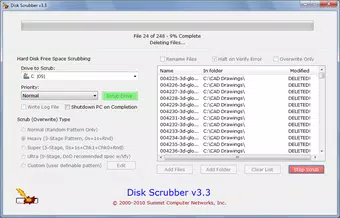
- Multiple Overwrite Levels: The tool offers five distinct overwrite methods, allowing users to select the level of security based on their risk tolerance. From quick wipes to more thorough, multi-pass erasures, this flexibility caters to different use cases and time constraints.
- Customizable Overwrite Patterns: Advanced users can define custom overwrite sequences, enabling compliance with specific regulatory standards such as DoD 5220.22-M or NIST 800-88. This level of control is particularly useful in regulated industries.
- Free Space Overwriting: Beyond individual files, the tool can scan and overwrite unused space on the hard drive. This prevents recovery of deleted file fragments that may remain in unallocated sectors.
- User-Friendly Interface: Despite its powerful capabilities, the application features an intuitive layout that simplifies navigation. Even non-technical users can perform secure deletions without requiring in-depth knowledge of data erasure protocols.
For example, a user preparing to sell their laptop can use the tool to wipe personal documents, photos, and financial records with a high-level overwrite. Similarly, an office administrator might use the free space overwriting function to sanitize a shared workstation before reassigning it.
Interface, UX & Performance
The interface of Hard Disk Scrubber is designed with simplicity and clarity in mind. Users are presented with a clean layout that prioritizes essential functions such as file selection, overwrite level configuration, and execution controls. Navigation is linear and consistent, minimizing user confusion during the data erasure process. The tool does not overload users with unnecessary options, maintaining a focused workflow that aligns with its core purpose.
Although the developer did not list formal performance metrics, the application’s file size of 1.8 MB suggests a lightweight footprint, which likely contributes to efficient operation on older or low-resource Windows systems. The tool appears to function reliably during execution, with no reported instability or crashes in publicly available sources. Responsiveness is expected to be consistent across device categories, including standard desktops and laptops, due to its minimal system requirements.
Performance during data wiping may vary depending on the selected overwrite level and the size of the target drive. However, the absence of real-time progress indicators or pause/resume functionality—though not explicitly mentioned—does not detract from its core utility. Overall, the user experience remains smooth and predictable, emphasizing reliability over advanced features.
Platform Compatibility & Technical Requirements
Hard Disk Scrubber is designed exclusively for the Windows platform, ensuring compatibility with a wide range of Windows operating systems. The tool’s software version is 1.1, and it has a file size of 1.8 MB, indicating a compact and lightweight installation. This small footprint suggests minimal system resource consumption, making it suitable for use on older or low-end hardware.
The developer did not specify minimum OS requirements, nor did they provide details on supported Windows versions beyond the platform. As such, compatibility with specific editions such as Windows 7, 8, 10, or 11 cannot be confirmed. Similarly, no information was provided about hardware specifications, driver compatibility, or installation prerequisites.
Given its release date in 2010, the application may function on legacy systems, but users should exercise caution when deploying it on newer Windows environments without verifying compatibility. For the most accurate results, users are advised to test the tool in a controlled environment before using it on critical systems.
Pros and Cons
Pros
- Free to download and use, making secure data deletion accessible to all users.
- Offers multiple overwrite levels for flexible security settings.
- Includes free space overwriting to eliminate residual data fragments.
- Lightweight design with a small file size of 1.8 MB.
- Intuitive interface suitable for both technical and non-technical users.
Cons
- Developer did not disclose minimum OS or hardware requirements.
- No information on support for newer Windows versions beyond the platform.
- Limited to Windows only—no availability for macOS or Linux.
- Outdated release date (2010) raises concerns about modern security compatibility.
- Lack of update history or recent development activity.
FAQ
Is Hard Disk Scrubber safe to use?
Yes, the tool is designed to permanently erase data, ensuring it cannot be recovered. However, users should carefully verify the files selected for deletion, as the process is irreversible.
Can I use Hard Disk Scrubber on older Windows systems?
While the tool was released in 2010 and may function on older Windows versions, the developer did not specify compatibility details. Testing on a non-critical system is recommended.
Does Hard Disk Scrubber work on SSDs?
Although the developer did not provide information on SSD compatibility, traditional overwrite methods may not be effective on solid-state drives due to wear-leveling mechanisms. Users should consult guidelines for SSD data erasure.
Is Hard Disk Scrubber regularly updated?
There is no publicly available information on update frequency or development activity. The last release was in 2010, which may indicate limited ongoing maintenance.
Can I recover files after using Hard Disk Scrubber?
No, once a file is scrubbed using the tool’s overwrite methods, it is permanently erased and cannot be restored through standard recovery tools.
Final Thoughts
Hard Disk Scrubber remains a functional utility for users seeking a no-cost solution for secure file deletion on Windows systems. Its core features—permanent deletion, multiple overwrite levels, and free space overwriting—address essential data privacy needs. While its age and lack of modern updates raise questions about long-term reliability, the tool continues to serve a niche audience requiring basic yet effective data erasure.
Individuals managing sensitive personal information, small business operators, or IT staff handling legacy equipment may find value in its straightforward approach. The absence of in-app purchases or hidden costs enhances its appeal. However, users should proceed with caution, especially on modern systems or SSDs, and consider verifying compatibility before use.
For those in need of a lightweight, free tool to securely wipe files and free space, Hard Disk Scrubber offers a practical option. Download Hard Disk Scrubber now.


